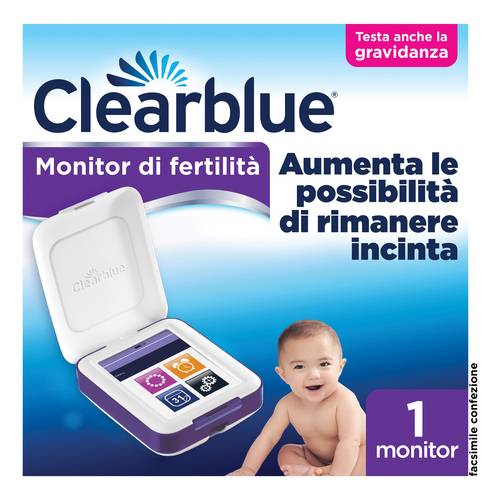
Description Clearblue Advanced Fertility Monitor is a device that monitors and records information on fertility and pregnancy.
It tracks the levels of 2 key hormones for fertility (estrogen and luteinizing hormone), identifying your fertility window each cycle, when the chances of conception are highest (the few days before and during ovulation).
The monitor reads simple urine tests to keep track of your personal hormone levels and has been designed to identify all days when your fertility is high and peak.
It helps identify more fertile days than any standard LH (Luteinizing Hormone) ovulation test and offers more opportunities to conceive each cycle.
The simple touch screen indicates on which days to perform urine tests and allows you to set an alarm as a reminder.
You can also mark on the calendar when you had intercourse and view all personal fertility information for the last 6 menstrual cycles on one screen.
By reading the specific hormone levels, the monitor displays your fertility level each day as “Low”, “High” or “Peak”, allowing you to plan and optimize your chances of conceiving.
Clearblue Advanced Fertility Monitor allows for pregnancy testing.
You can check if you are pregnant starting from 3 days before your expected period. The monitor will calculate when your period may arrive, so you can find out as soon as possible if you are pregnant.
How to use
Before use, always read the instructions on the packaging and in the instruction booklet.
Set up the monitor and wait for your next menstrual cycle to begin before setting a new cycle and testing interval. The testing interval is a 6-hour period during which you can perform the test with your first morning urine.
Always start the testing cycle with a sufficient number of fertility tests from the same batch for at least 10 tests.
Perform fertility tests when the monitor shows the test day screen and always during the time interval for testing.
Turn on the Clearblue Advanced Fertility Monitor every morning during the testing time to see if you can perform a fertility test.
Always use the first morning urine or urine obtained after the longest sleep period.
When ready for the test, remove a stick from the packaging and use it immediately.
Immerse the absorbent tip facing down in the urine stream for only 3 seconds or collect a urine sample in a clean, dry container and immerse the absorbent tip in the urine for only 15 seconds.
Holding the stick facing down, remove the cap from the handle and place it on the absorbent tip.
Wipe off any excess urine from the stick.
Immediately insert the stick into the monitor’s test slot and place it on a flat surface.
Wait 5 minutes. The screen will turn off after 1 minute, but the monitor continues to analyze the sample. During the test, the indicator blinks.
At the end of the test, a sound will be emitted. If the monitor is off, turn it back on. The screen will prompt you to remove the stick before displaying the result. Dispose of the used stick in normal household waste.
Reading results:
– Low: estrogen and luteinizing hormone (LH) levels are low; it is unlikely (but not impossible) to become pregnant
– High: when the monitor detects an increase in estrogen levels, it displays “High”. In the following days, the monitor will try to detect the LH peak. It will continue to display “High” until the LH peak is detected and “Peak” is displayed. You must continue testing as required by the monitor.
The menstrual cycle varies from woman to woman and hormonal patterns can differ, so the number of days with high fertility that you see is a personal characteristic.
– Peak: when the LH peak is detected, the monitor displays “Peak”. You will notice that “Peak” will be displayed for 2 consecutive days. The most fertile period includes the day of the LH peak and the following day (normally the day of ovulation).
If you have used the monitor for a pregnancy test, the result will be displayed. The result will also be shown on the calendar screen.
Warnings
Dispose of the used stick in normal household waste.
Never reuse the stick.
Not for internal use.
Keep out of reach of children.
Do not use the stick if the aluminum wrapper is damaged.
Do not use after the expiration date.
Format
The package contains 1 touch-screen fertility monitor.
Code 81540439







Reviews
There are no reviews yet.
Only logged in customers who have purchased this product may leave a review.